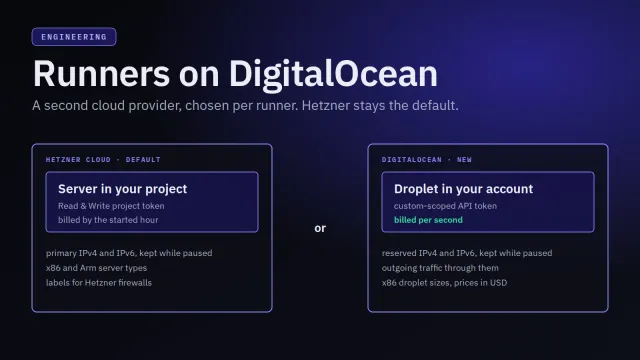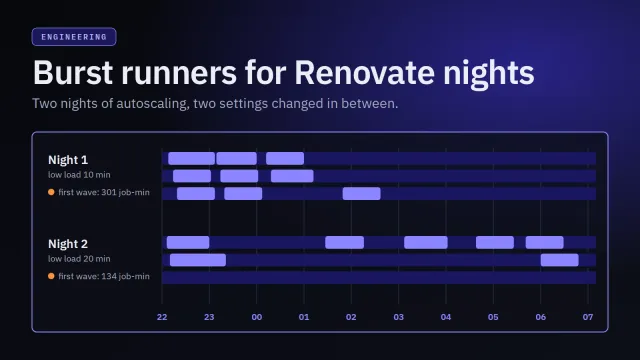
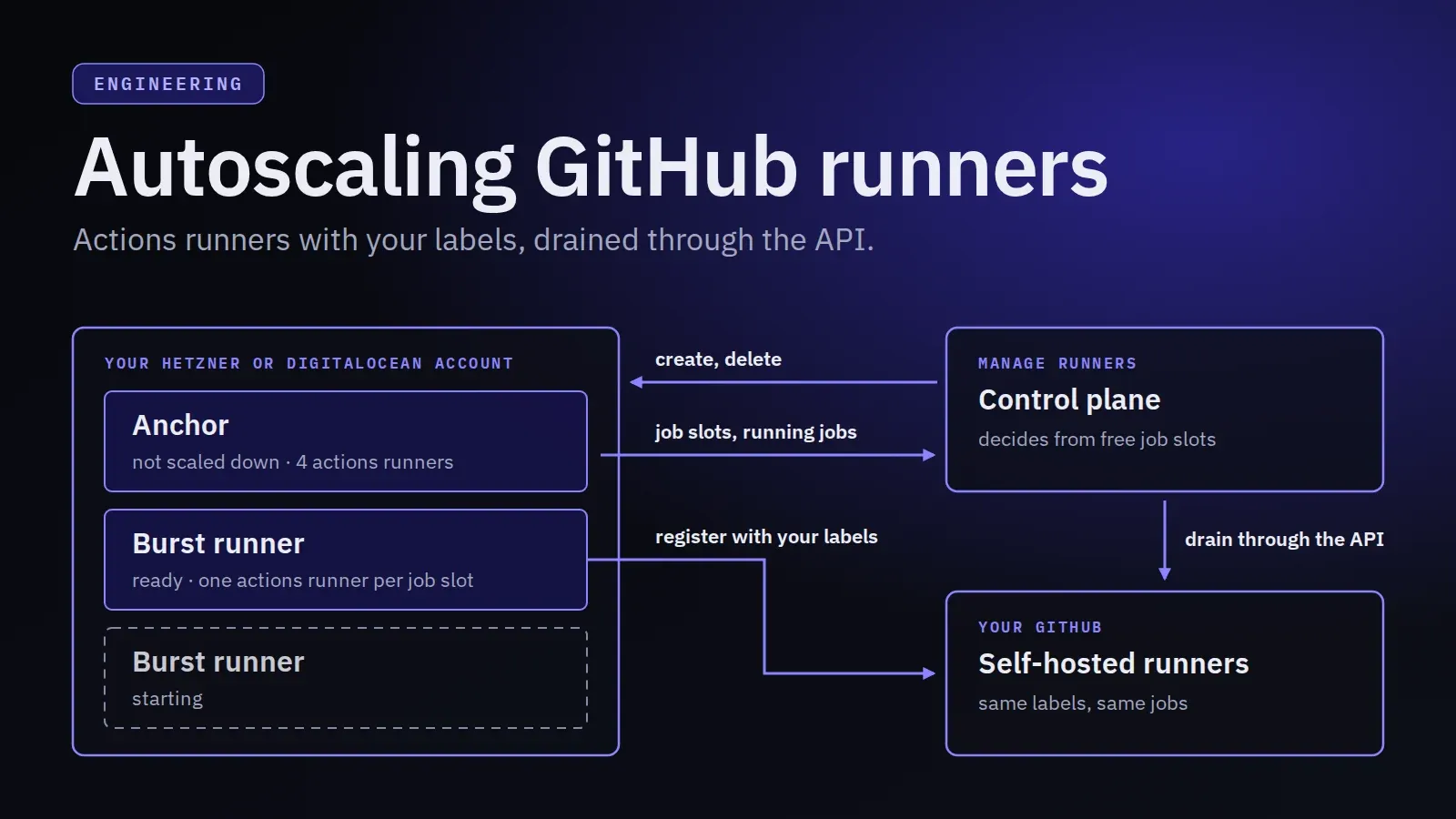
Manage Runners creates GitHub Actions self-hosted runners for a repository or an organization on github.com, each on a server in your Hetzner project or DigitalOcean account. Every runner has a fixed number of job slots. When all of them are busy, jobs wait in GitHub. Autoscaling changes that: while a runner’s job slots stay full, Manage Runners adds more servers next to it, and once the load fits on fewer, it removes them again.
The decisions are the same as for GitLab runners, which How autoscaling works for GitLab runners explains in detail. How a new server joins GitHub, how jobs find it and how it leaves again are not. The idea: add whole servers that register as more runners with the anchor’s labels, decide from the job slots they report, and take them out of GitHub before their servers go.
Anchors and burst runners
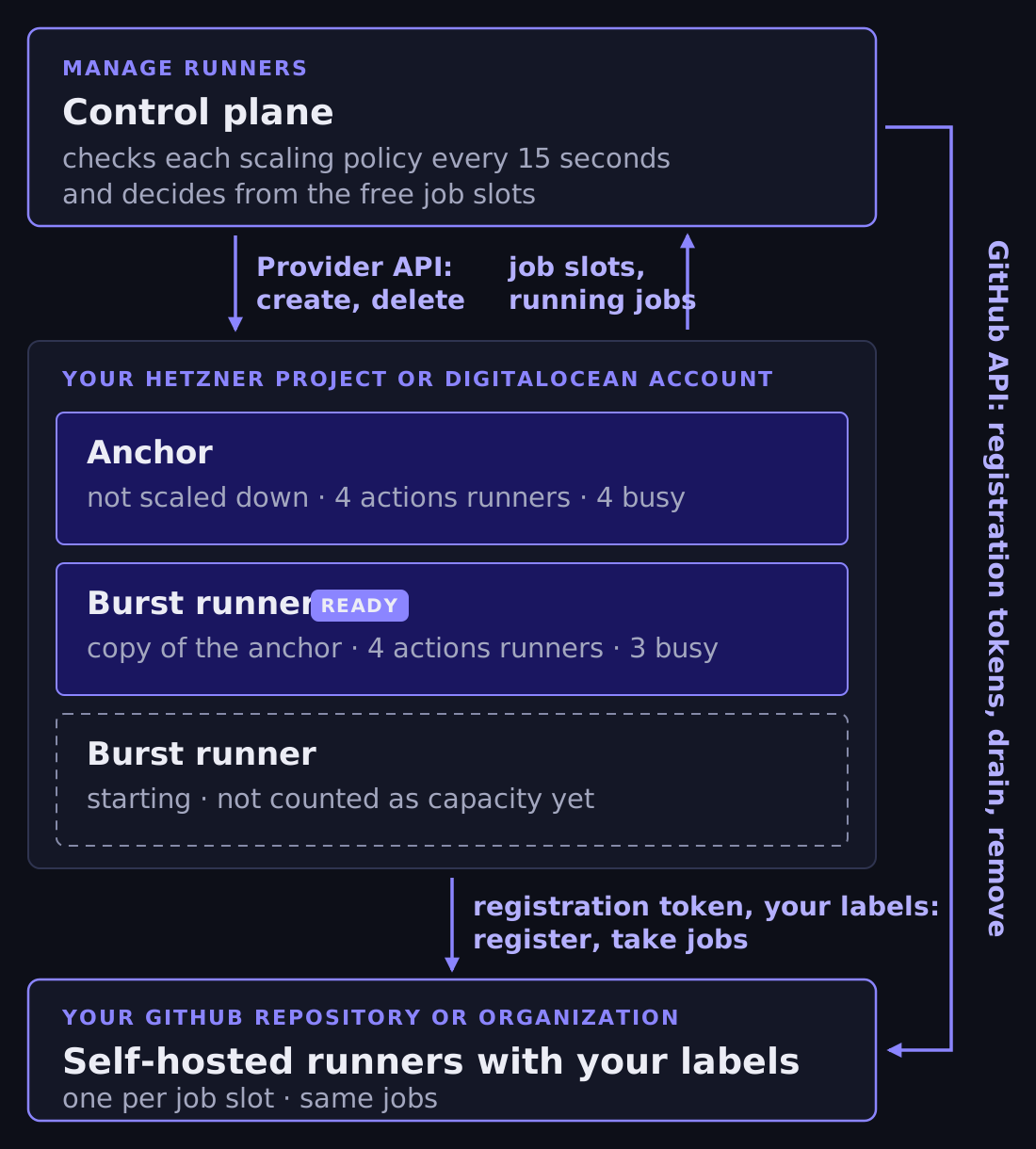
Autoscaling is set up per runner with a scaling policy. The runner that has the policy is the anchor: a GitHub runner that Manage Runners created, or an external runner on the GitHub platform, such as your own dedicated server. Autoscaling adds capacity next to the anchor and never stops it, so there is no scale-to-zero.
The servers it adds are burst runners. For a Manage Runners anchor, each one is a copy of the anchor at the moment it is added: server type, location, Hetzner project or DigitalOcean account, GitHub settings with the token, concurrency, SSH keys, labels and Metrics connection. Manage Runners didn’t set up an external anchor, so its policy describes the burst runners instead: cloud provider, server type, location, provider token, concurrency from 1 to 32, SSH keys, labels, and the GitHub settings: the repository or organization, for an organization the runner group, and a fine-grained personal access token. Saving the policy checks the SSH keys against the token’s Hetzner project or DigitalOcean account. Whenever the GitHub token, the repository, the organization or the runner group changes, it also asks GitHub for a registration token, which needs the same permission as registering a runner. That catches a token without the right permission before any server is provisioned.
A policy has a maximum of 1 to 20 burst runners, a step size of 1 to 5, and rules. Burst runners always have Monitoring on, because decisions depend on their reports. Otherwise they are ordinary runners, shown after their anchor with a Burst badge. You can delete one, but editing, pausing, resuming, duplicating or scheduling it is refused, so the policy and a person don’t fight over a server.
One actions runner per job slot
An instance of GitHub’s actions runner runs one job at a time. So a server gets as many instances as the runner has job slots, from 1 to 32. Cloud-init downloads the actions runner release for the server’s architecture, checks its SHA-256 checksum, and unpacks one copy per instance into /opt/actions-runner/<i>. Each copy is registered with config.sh and installed as its own systemd service, running as the non-root github-runner user, which is in the docker group and so has access to the host’s Docker daemon:
./config.sh --unattended --replace \
  --url https://github.com/<owner>/<repository> \
  --token <registration token> \
  --name <runner name>-mr<runner id>-<i> \
  --labels <your labels> \
  --runnergroup <group>   # organization runners only
The registration name ends in the runner’s ID in Manage Runners and, with more than one job slot, the instance number. That’s how the control plane later finds exactly this server’s instances among all the runners of a repository or organization, also after a rename.
Your personal access token never reaches the server. When a server is set up, the control plane uses it to ask GitHub for a registration token, and only that goes into the server’s cloud-config. GitHub lets it expire after an hour, and Manage Runners doesn’t store it. A burst runner gets its own registration token the same way, minted with the anchor’s GitHub token when its server is set up.
The server reports ready only when every instance’s service is active. If installing or registering fails, it reports that instead, and the runner’s state becomes REGISTRATION_FAILED. For a burst runner, that counts as a failure, which Keeping the number of servers bounded comes back to.
Labels decide where jobs go
GitHub has no idea of an anchor and its burst runners. To GitHub, a burst runner’s instances are more self-hosted runners of the same repository or organization, in the same runner group, with the same labels. What makes them share the anchor’s jobs is the labels.
GitHub gives a job to an idle runner that has all the labels in its runs-on. Every self-hosted runner also gets default labels from GitHub: self-hosted, the operating system (linux here) and the architecture (x64 or arm64). A job that asks only for those can go to any self-hosted Linux runner of that architecture that the repository can use, also outside the group. Give the anchor a label of its own and ask for it:
jobs:
  build:
    runs-on: [self-hosted, build]
The anchor and every burst runner have the build label, so the job goes to whichever of them has a free instance first. GitHub stores a runner’s labels with its registration, which is why changing the labels of a Manage Runners GitHub runner recreates its server. Burst runners copy the labels when they are added.
The signal: free job slots
A job slot is room for one CI job: on a GitHub runner, one instance of the actions runner. A Manage Runners runner has as many as its concurrency.
The numbers come from the metrics collector that runs on each server. Once a minute it counts the actions runner’s processes and pushes the result to Manage Runners with CPU and memory usage. Each instance waits for jobs in a Runner.Listener run process and starts a Runner.Worker spawnclient process for every job it runs. The collector runs as its own unprivileged user, so it identifies them by their command line in /proc: the listeners are the job slots, the workers the running jobs. The collector caps the worker count at the listener count, so it never reports more running jobs than job slots. On an external runner, the agent version 1.2.0 or later counts them the same way and reports the listeners as its job limit.
The group is the anchor plus its burst runners that are ready and reported within about three minutes, and its free job slots are:
free = (anchor slots + Σ slots of ready burst runners) − (running jobs of all of them)Rules look at the past minutes one at a time, as one-minute buckets, with each report counting for one minute only. A rule holds only when it holds in every minute of its duration, so a short spike doesn’t scale anything out. The GitLab article has the details of how reports fill the buckets.
Scaling out
The main rule has one number, K, and a duration: scale out when at most K job slots are free for M minutes. The presets are this rule with fixed values:
| Preset | Scale out when | For |
|---|---|---|
| Eager | at most 1 job slot is free | 2 minutes |
| Balanced (default) | no job slot is free | 3 minutes |
| Conservative | no job slot is free | 5 minutes |
Custom rules, up to three, one per metric, allow any K from 0 to 20, and CPU or memory with a scale-out and a lower scale-in threshold in percent. Scale-out needs any rule to hold.
Manage Runners checks every policy every 15 seconds. Even when a rule holds, nothing is added while:
- the group is idle: the newest fresh report of the anchor and of each ready burst runner that has one says that no job is running;
- a burst runner is still starting;
- the newest burst runner became ready less than the wait after ready time ago (default 3 minutes), so the figures can catch up;
- the maximum is reached, counting every burst runner that exists, including starting and draining ones;
- the policy is waiting after a failure or for the cloud provider, or the organization’s plan doesn’t include autoscaling.
A scale-out adds the step size, never more than the maximum allows. With the presets, a burst runner is requested 2 to 5 minutes after the slots fill up, then needs a few minutes to boot, install the actions runner and register. One that isn’t ready within 15 minutes is deleted and counts as a failure.
The signal is the job slots the servers report, not GitHub’s queue: Manage Runners doesn’t receive workflow_job webhooks and doesn’t read your workflow runs. Jobs waiting in GitHub’s queue show up only indirectly, as job slots that stay full.
Scaling in
Scale-in asks a different question about the same K: would more than K job slots still be free without one burst runner, for the whole remove after low load window (default 10 minutes)? The jobs of that runner count as if they had moved to the others.
Take an anchor with 4 instances on Balanced (K = 0). All four were busy for three minutes, so a burst runner with four instances was added. Later, three jobs run across the eight. Without the burst runner, 4 − 3 = 1 slot would be free, which is more than 0. Once that has held for 10 minutes, the burst runner can go.
Added at K or fewer free, removed only when more than K would stay free without it: after a removal, the group is still above the line where runners are added, so the number of burst runners doesn’t swing back and forth. A free job slots rule also allows scale-in when the group ran no job for the whole window, so a K as large as the slots the group keeps still lets the last burst runner go. That needs a known zero from every runner in every minute. CPU and memory rules get the same effect from their two thresholds, and while scale-out needs any rule, scale-in needs every rule to allow it.
Choosing which runner leaves, and when
Load-based scale-in starts draining at most one ready burst runner a minute. Which one, and when, depends on what its provider bills:
- Hetzner bills a server for every hour it has started, from its creation. A Hetzner burst runner is drained only in the last 15 minutes of its current paid hour, counted from the time Hetzner created its server. When several qualify, the one closest to the end of its hour goes first; on a tie, the one with fewer running jobs.
- DigitalOcean bills droplets per second, with a minimum of 60 seconds, so there is no hour to wait for. A DigitalOcean burst runner is drained as soon as the load has been low for the window; among several, the one with fewer running jobs goes first.
Failure cleanup and explicit stops, such as disabling the policy, don’t wait for the paid hour. The dashboard counts a burst runner’s running time from its server’s creation, for example Running for 1 h 12 min · since 14:02, so it matches what the provider bills.
Draining through GitHub’s API
A GitLab burst runner is drained by shutting its server down: GitLab Runner takes SIGQUIT as its signal to finish the running jobs and stop. That doesn’t work for the actions runner, which cancels its job when it is stopped. And GitHub doesn’t recommend autoscaling persistent runners, because it can’t always guarantee that it won’t assign a job to a runner while that runner is shut down.
So a GitHub burst runner is drained through GitHub’s REST API while its server keeps running. The first step runs when the drain starts, and then one every minute:
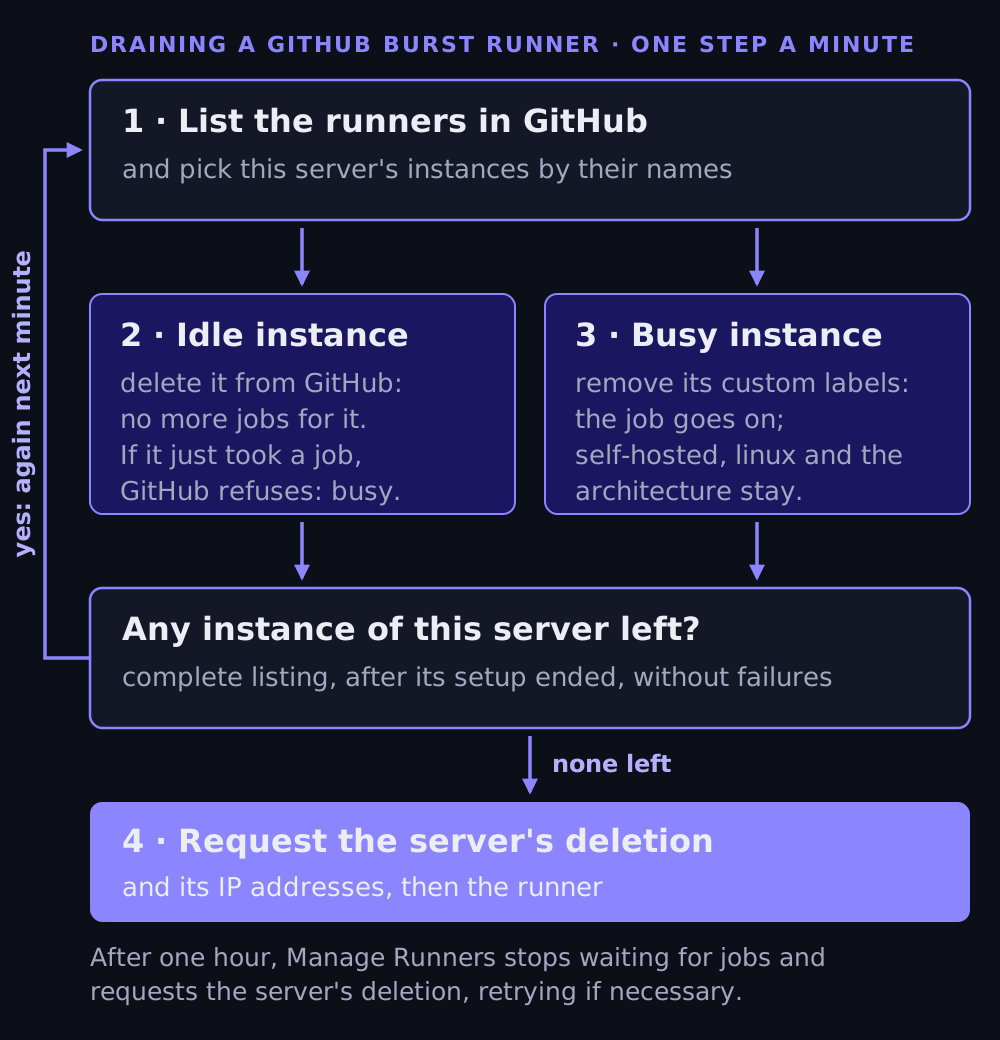
- List the runners of the repository or organization and pick this server’s instances by their names.
- Delete each idle instance from GitHub. Once it is deleted, GitHub gives it no more jobs. If it took a job in the meantime, GitHub refuses the deletion, and the instance is treated as busy.
- Remove the custom labels of each busy instance. GitHub keeps the read-only labels,
self-hosted, the operating system and the architecture. The running job goes on, and once it has finished, the next step finds the instance idle and deletes it. - When a complete listing shows none of the server’s instances left, the burst runner is drained, and Manage Runners requests the deletion of its server.
Only a listing that is complete, without failures, and taken after the server finished its setup counts as drained: while cloud-init is still running, the server could still register an instance. Each step has a budget of three minutes. A step that runs out of time, or whose requests to GitHub fail, is simply repeated a minute later.
Starting a drain doesn’t stop GitHub from assigning jobs at once. What keeps new jobs away from an instance is one of these requests succeeding:
- Deleted: it gets no jobs at all.
- Custom labels removed: it no longer matches jobs that ask for one of the anchor’s own labels. It still has the default labels, so if its job finishes between two steps, GitHub can give it a job that asks only for
self-hosted,linuxand the architecture before the next step deletes it.
Until then, for example while GitHub’s API fails, an instance can still take any job that matches its labels.
The drain has the same deadline as for GitLab runners. Once the server has no instances left in GitHub, or one hour after the drain started, Manage Runners stops waiting for jobs and requests the deletion of the server and its public IP addresses, retrying until the provider confirms it. A job still running then ends with the server. When the burst runner is deleted, Manage Runners lists its instances once more and removes any that are left from GitHub. One that GitHub still won’t remove goes away on its own, since GitHub removes a self-hosted runner that hasn’t connected for more than 14 days.
What Manage Runners sends to GitHub
The control plane talks to GitHub only through the self-hosted runner endpoints of the repository or organization you entered, with the fine-grained personal access token:
| Request | When |
|---|---|
POST …/actions/runners/registration-token |
to check the token before every runner is created, burst runners included, and when a policy’s GitHub settings change; and for every server that is set up |
GET …/actions/runners |
in each drain step and when a runner is deleted, up to 10 pages of 100 runners |
DELETE …/actions/runners/{id} |
for an idle instance during a drain, and for what is left when a runner is deleted |
DELETE …/actions/runners/{id}/labels |
for a busy instance during a drain |
The token needs the repository permission Administration (read and write) for a repository runner, or the organization permission Self-hosted runners (read and write) for an organization runner. It is stored encrypted and never shown again. Requests go only to api.github.com, and the client doesn’t follow redirects, so the token never goes to another host. Manage Runners doesn’t read your code, workflows or job logs; jobs flow only between the servers and GitHub.
Keeping the number of servers bounded
Every scale-out creates servers in your Hetzner project or DigitalOcean account. The guards that keep their number where you set it are the same as for GitLab runners, and the GitLab article describes them in detail. In short:
- Reserve before provisioning. A burst runner is reserved against the maximum, under the policy’s lock, before the provider is asked for a server, and counts until its server is deleted, also while it starts, drains or waits for a blocked cleanup. For an external anchor, the reservation is also refused when the anchor is no longer on GitHub, so burst runners never register on another platform than the anchor’s jobs come from.
- Failures back off, then stop. A burst runner that can’t be created, isn’t ready within 15 minutes or fails to register counts as a failure; the burst runners of one scale-out step count once. A GitHub token that has expired or lost its permission shows up here: GitHub refuses the registration token that every new burst runner needs. Manage Runners waits 5 minutes after the first and 10 after the second; the third in a row disables the policy, drains its burst runners and emails the organization’s owners and editors.
- Provider shortages only back off. No capacity for the size in the location, a reached account limit, or a cloud provider or GitHub that is briefly unavailable is no failure: the burst runner is deleted, and Manage Runners waits 5, 10, 20, then every 30 minutes before trying again, for as long as it lasts. A reached limit emails the owners and editors once.
- Uncertain servers are found again by the Hetzner label
managerunners-runneror the DigitalOcean tagmanagerunners-runner:<runner id>, and deleted through the usual path.
Turning it off. Disabling or deleting the policy, deleting the anchor, or pausing a Manage Runners anchor, by hand or by its schedule, starts the removal of every burst runner, each drained through GitHub as above.
Hetzner vs DigitalOcean
The signal, the rules, the reservation and the drain through GitHub don’t depend on where a server runs. The autoscaler knows each provider only by its billing period, and what the provider offers sets a few limits:
| Hetzner Cloud | DigitalOcean | |
|---|---|---|
| Billing | every started hour | per second, at least 60 seconds |
| Load-based scale-in | in the last 15 minutes of the paid hour, closest to its end first | as soon as the load has been low for the window, fewer running jobs first |
| Server types | x86 and Arm | x86 only |
| GitHub labels | also put on the server, so they must be valid Hetzner labels | only registered with GitHub |
| Found again by | the label managerunners-runner on the server and its primary IPs |
the tag managerunners-runner:<runner id> on the droplet |
| Public addresses | primary IPv4 and IPv6 | reserved IPv4 and IPv6 |
Scale-in timing. The victim choice waits for the last 15 minutes of a billing period only when the period is longer than those 15 minutes. With DigitalOcean’s, every ready burst runner qualifies at once, but the remove after low load window and the limit of one drain a minute still apply. A shorter window can make DigitalOcean burst runners eligible for removal sooner. On Hetzner, a burst runner must also be in the last 15 minutes of its paid hour; if the window ends too late for that, it stays into another paid hour. What you actually save depends on when draining and deletion finish, and draining through GitHub takes as long as the running jobs, on both providers.
Cross-provider burst runners. A Manage Runners anchor’s burst runners use its provider by default. The policy can put them on the other one instead, for example DigitalOcean burst runners for a Hetzner anchor. It then stores the server type, location, API token and SSH keys for that provider, and saving checks that the server type is offered in the location and that the SSH keys belong to the token’s project or account. Everything else still comes from the anchor: the repository or organization, runner group, GitHub token, concurrency, labels and Metrics connection. Each burst runner follows its own provider: its scale-in timing, its cleanup and its token are that provider’s, not the anchor’s. An external anchor’s policy names the burst runners’ provider directly.
Labels. A GitHub runner’s labels are registered with GitHub and, on Hetzner, also become server labels, which Hetzner firewalls can select. So on Hetzner they must also be valid Hetzner labels, key or key=value with limited characters and length. That is checked when a runner is saved, and when a policy that puts burst runners on Hetzner is saved. Droplets get no labels, only the owner tag, so on DigitalOcean any label GitHub accepts works.
Architecture. DigitalOcean has no Arm droplets. DigitalOcean burst runners of an Arm anchor on Hetzner are x86 servers with the x64 label instead of arm64. A job with runs-on: [self-hosted, arm64, build] never goes to them, and one with runs-on: [self-hosted, build] can land on either architecture. Manage Runners doesn’t stop you from combining the two, so pick a provider that matches what your jobs ask for.
Account limits and addresses. Every DigitalOcean burst runner needs a droplet, a reserved IPv4 and a reserved IPv6 within the account’s limits. A creation refused at a limit doesn’t count as a failure: autoscaling waits and tries again, and emails the organization’s owners and editors once. After a droplet is deleted, DigitalOcean can take some minutes to release its reserved IPv4; until it has, the burst runner isn’t deleted yet and keeps counting against the maximum.
Seeing what it does
Every check records its decision and reason; the runner’s card shows the last one with the group’s capacity, for example 3 of 8 job slots busy · 5 free. The autoscaling page explains the setting for the current slots (With 4 job slots now: a burst runner starts when all 4 are busy for 3 minutes) and keeps an event log in sentences built from the rule that fired:
Added burst runner build 2: no job slot was free for 3 minutes
Draining burst runner build 2: without this runner, at least 1 job slot would have been free for the last 10 minutes
Burst runner build 2 was deleted
When nothing happens, the reason says why, for example that a burst runner is starting or the maximum is reached. Each is logged once when it changes, not on every check.
Policies are also in the CLI, for example manage-runners runner autoscaling set --name build --preset balanced --max 3 --yes, where --yes skips the confirmation prompt; for an external GitHub runner, --github-owner, --github-repository, --github-runner-group and --github-token-env describe the burst runners’ GitHub side. The MCP server has the same policies for AI assistants. Its tools never take tokens: when an external runner’s policy needs them, the assistant hands you a dashboard link to enter them yourself.
The trade-offs
This design makes choices you will notice:
- Minutes, not seconds. Reports arrive once a minute, a rule must hold for its duration, and a new server takes a few minutes to boot and register. Autoscaling absorbs busy periods; it doesn’t make one workflow start faster.
- No queue signal. Manage Runners sees busy job slots, not jobs waiting in GitHub.
- No scale-to-zero. Autoscaling leaves the anchor running; it supplies the signal.
- Persistent runners, whole servers. A burst runner’s instances take job after job until it is drained, like the anchor’s, and its jobs share the server. It is billed by the started hour on Hetzner and per second on DigitalOcean.
GitHub’s own route is different. It recommends autoscaling with ephemeral runners, which take a single job each, and its reference implementation is Actions Runner Controller: a Kubernetes operator whose runner scale sets grow and shrink with the demand from your workflows, with ephemeral, container-based runners. Outside Kubernetes, GitHub offers the Runner Scale Set Client and workflow_job webhooks to build your own. Because they react to queued jobs, they can scale from zero and give every job a fresh runner.
Manage Runners takes another route. The long-lived component that decides is its control plane, not a cluster or process on your infrastructure, and each burst runner is a complete server running the actions runner, registered like the anchor. There is nothing to configure on the anchor, it works next to an existing external runner, and every burst runner is an ordinary runner you can see and delete. Draining through the API addresses GitHub’s concern with shutting down persistent runners once its requests succeed: a deleted instance gets no jobs, and one without its custom labels still matches jobs that ask only for the default labels. In exchange, it reacts in minutes and scales in whole servers.
The autoscaling manual has every setting and limit, the CLI reference the runner autoscaling commands, and DigitalOcean setup the provider’s token and limits. Autoscaling is part of the Pro and Enterprise plans. For GitLab runners, read How autoscaling works for GitLab runners.